Place materials in this Google Drive that you need to store and share with members of your group, the CAAD interdisciplinary arts coordinator, and/or your DiSSCo liaison. This helps ensure that sharing and backup of your items is successful.
Create an item
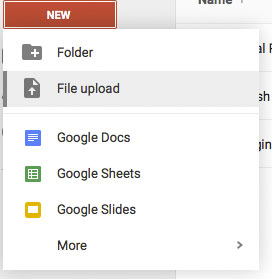
You can create new folders, documents, spreadsheets, presentations, and more by clicking the red NEW button  on the left side of your screen (or on the top if you are using the mobile app).
Upload a file
You can upload items (like sound/audio files, videos, and more) by clicking New > File Upload:
Using Your Folders and Files
Every item that you place in Google Drive will be shared by your group members, faculty advisers, and DiSSCo liaison.
As noted above, you can create new documents, new folders, and new files. How you arrange them is up to you!
| CAUTION!
Remember, this is a shared folder. If you use Google’s capacity to view your drive on your computer instead of the web, the sharing aspect does not change. Delete files very carefully! |
| MOVE, DON’T DELETE
Best practice tip: if you are unsure about what to delete, move the materials into the folder marked “Trash” in your drive. This will move the files out of the way, but will keep them in Google Drive in case you need them later. |
For more information, view the “Help” area in Google Drive, or the CAAD summer project website.